Libertas Schema Document Translation Guide
The parser-generated default-locale document and schema signature are the structural authority. Translation changes localized text only. It never changes schema structure, identifiers, numeric IDs, or runtime behavior.
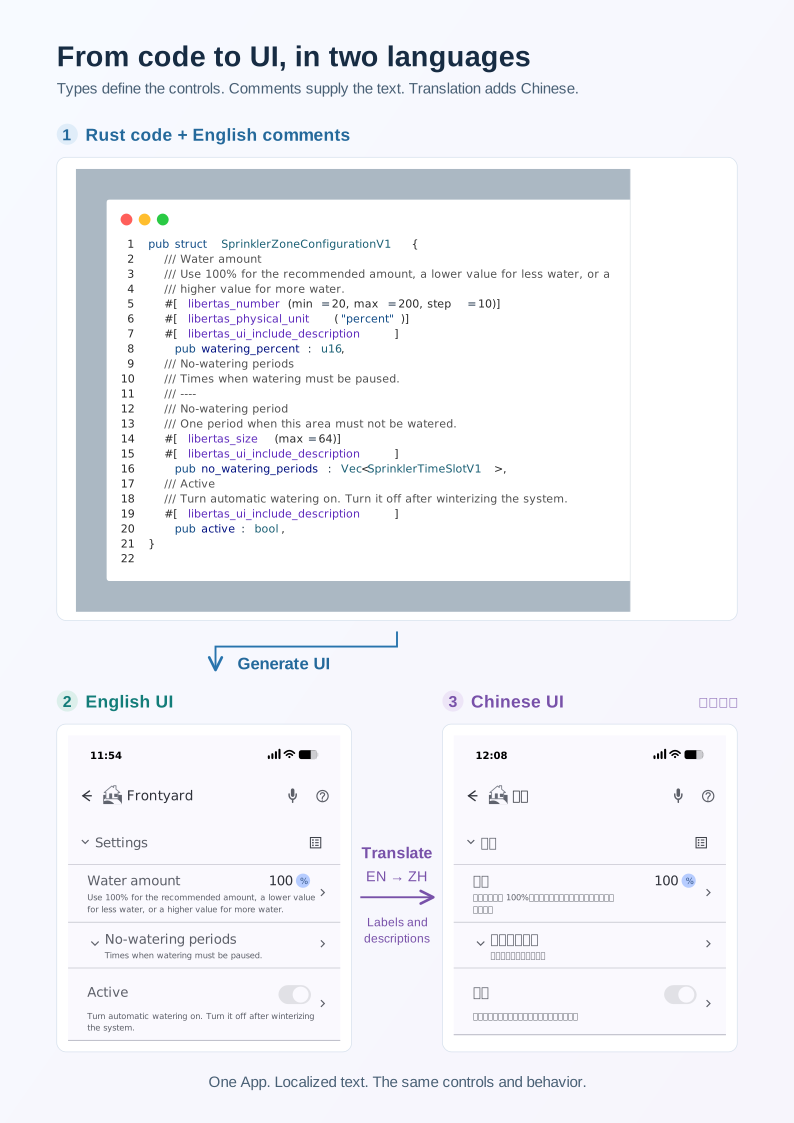
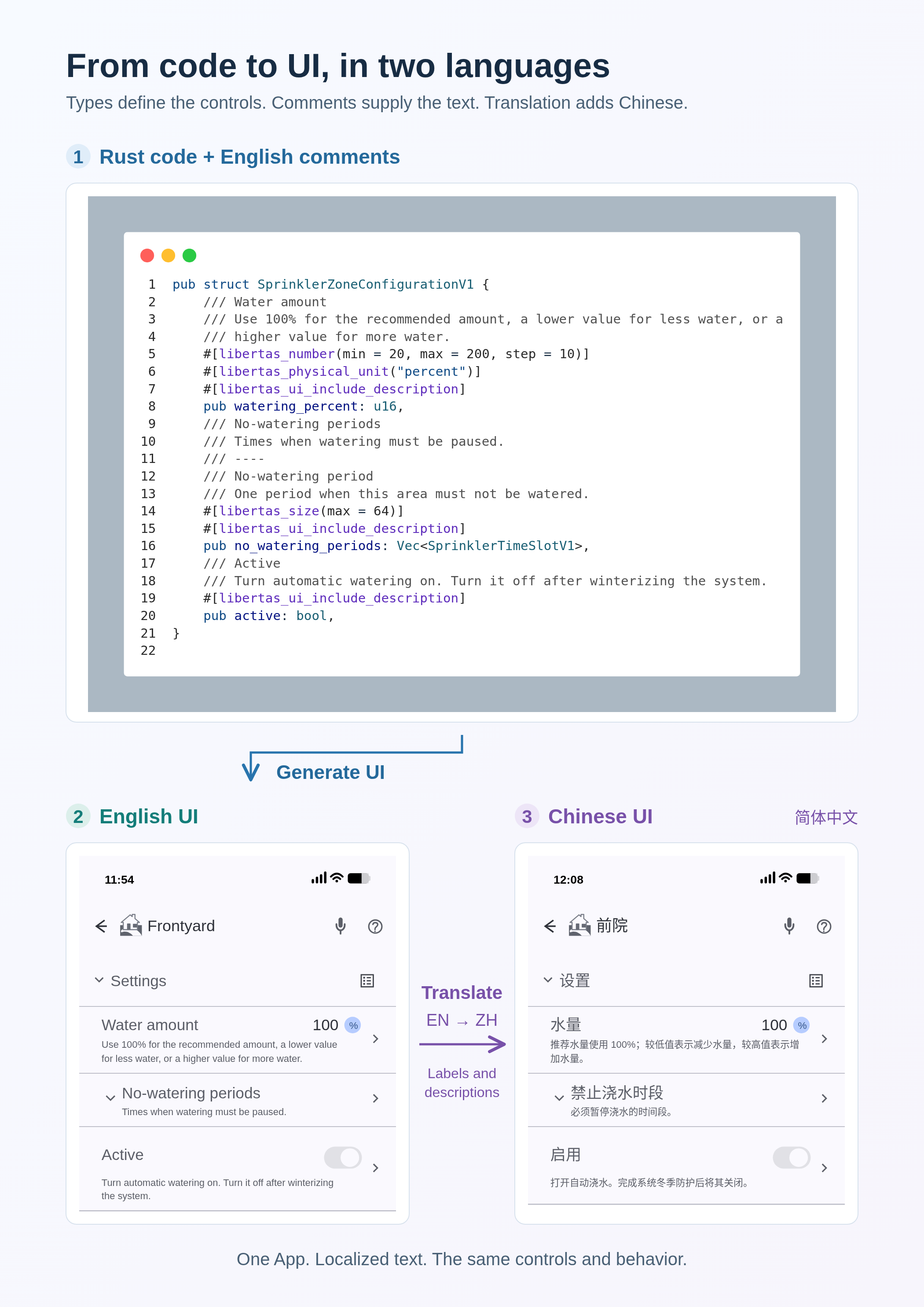
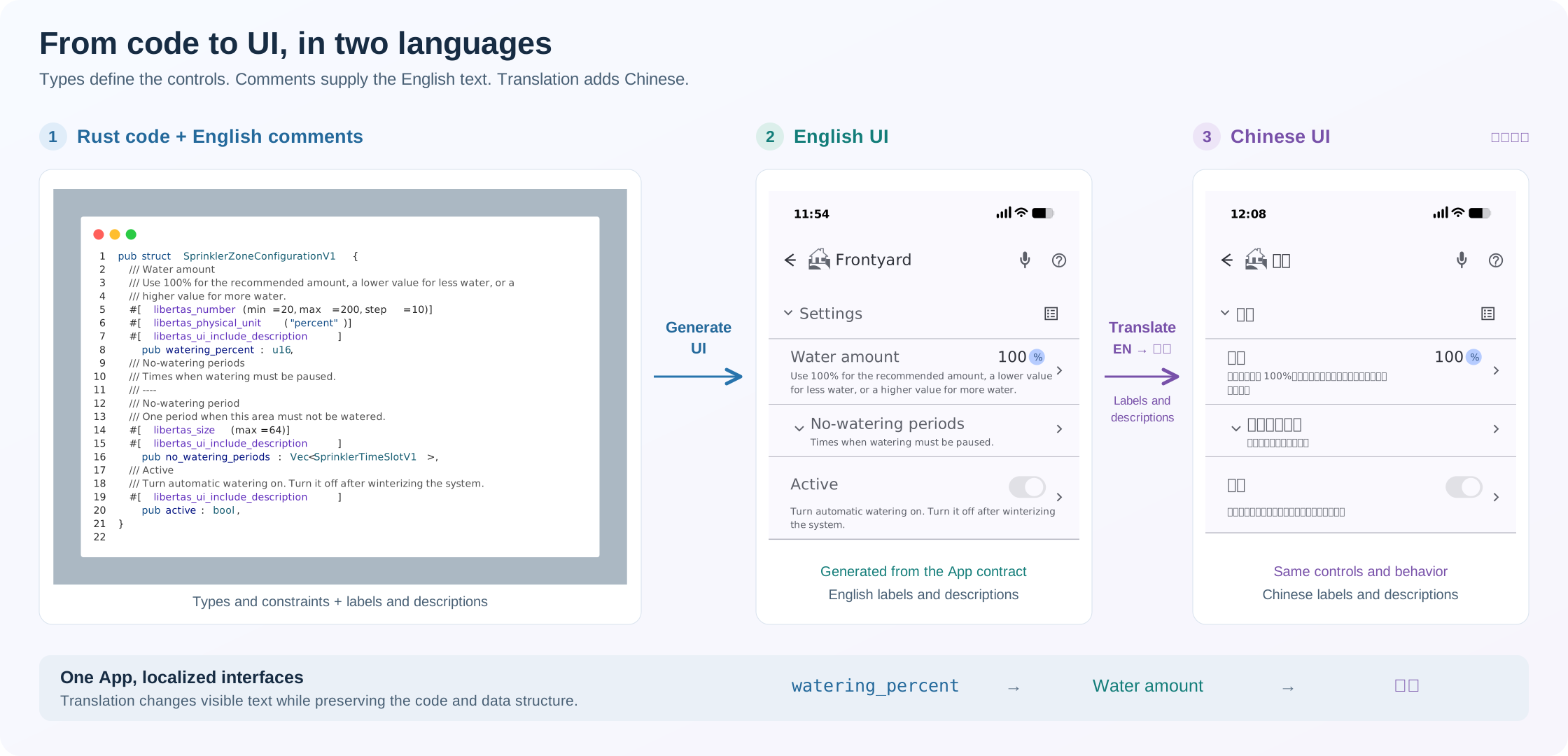
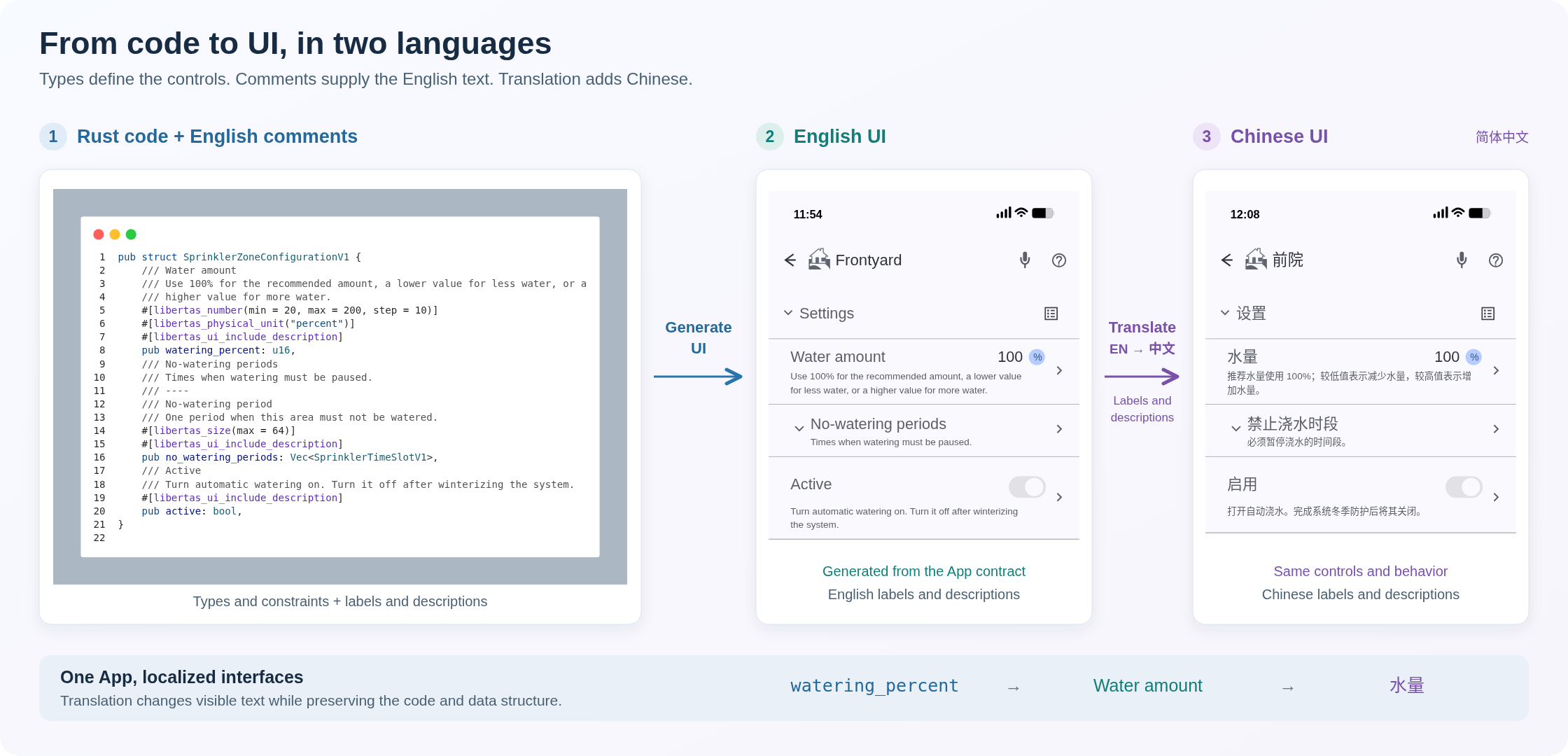
Sprinkler configuration example: types and constraints define the controls; English source comments provide labels and descriptions. Translating that text produces a Chinese interface with the same controls and behavior. Open the portrait A4 diagram to inspect the code and both interfaces, or download its PNG. The wide layout is also available as an SVG or PNG.
Translated text follows the user-language invariant: natural wording that describes what people can do and understand.
Codebots that author the default-locale source must first follow the schema documentation contract for every schema-visible node, custom property, and string resource. This guide then governs how that complete default document is translated.
Before you begin
Open a file in the package and run Libertas: Translate from the Command Palette. Studio detects the package from the active editor or workspace. If it needs a package choice, it asks. Choose the Hub containing the installed App; Studio skips this picker when only one Hub is configured. The command loads that Hub's current schema and translations and opens the same App Translation screen as the Admin panel. Install or deploy the App to that Hub first if its metadata is unavailable.
An App Translation screen opened from a Hub already has the selected Hub: that connection supplied its current translations and receives the import. No second Hub selection or OK step is required. A Schema Editor opened explicitly in local mode has only project files; select the intended Hub workflow when you need an immediate Hub update.
The locale-picker instructions below describe Studio builds with Other locale... available. If your installed build lacks it, use an offered locale or update Studio before following the manual-tag steps.
Translation workspace
For a local project, Libertas Studio keeps the translation handoff under the project root:
developer-package/
├── src/
└── translations/
    ├── manifest.json
    ├── TRANSLATION-CODEBOT.md
    ├── TRANSLATION-CHATBOT.md
    ├── CODEX_TRANSLATION.md
    ├── TRANSLATION-WORKSET.json
    ├── TRANSLATION-RESULT.json
    ├── developer-package.en.doc.json
    └── developer-package.fr-FR.doc.json
The directory is intentionally visible and durable. It may be reviewed and
committed with the project. Studio does not place translation inputs in src/
and does not delete them after import.
When the Schema Editor was opened from a Hub or the Admin panel, it has no source
file path of its own. Studio first resolves the exact matching package from
active or visible editors and then from all Libertas projects in the open
workspace. It never writes translation artifacts into an unrelated package. If
duplicate local projects have the same package name, Studio asks which project
directory to use. If there is no matching local project, Studio creates a
durable per-package workspace under the extension's global storage and opens
the generated prompt from there. The completion message shows the exact
translations/ path used for saving and importing the result.
manifest.json records the exact schema signature, structural document hash,
and trusted per-locale Codex baselines. Studio uses those signatures when a
later schema inserts, removes, or reorders fields. Existing localized text
follows the same native declaration path rather than its old array position or
numeric ID. A baseline is trusted only while its recorded target-document hash
matches the locale currently open in the editor.
Choosing a translation method
Select Translate… in the editor's header. A searchable list offers every method:
- Translate automatically: Claude Code, Codex, or Claude API translates the document for you. See automatic translation.
- Translate with another assistant: Codebot prompt or Chatbot prompt prepares a prompt for an assistant you run yourself, and Import translation… brings its result back. See manual bot handoff.
Remove Translation stays beside Translate… and applies to the locale open in the editor.
Choosing a locale
+ New Locale..., each automatic translation service, and both prompts offer
popular locales searchable by tag or language name. Choose
Other locale... to enter any locale tag accepted by the
translation contract, such as uk-UA or sr-Latn-RS.
The popular Chinese choices are zh-Hans (Simplified) and zh-Hant
(Traditional); zh-CN and zh-TW remain accepted without renaming existing
documents.
Translation actions also list existing locales so they can be updated. The default locale cannot be a translation target. + New Locale... excludes all existing locales and then asks which existing locale to copy from. These restrictions also apply to manually entered tags.
Automatic translation
- Open the Schema Editor for the package you intend to translate.
- Select Translate… and choose Claude Code, Codex, or Claude
API. Check one or more target locales, and confirm
the selection. Choose Other locales... to add tags separated by commas or
spaces, such as
uk-UA, sr-Latn-RS, fr-CA. Duplicate tags are translated once. If the selection includes existing locales, keep Automatic update or choose Fresh translation for those locales before the queue starts. Use Fresh translation to improve wording throughout an existing locale; Automatic update preserves text whose source has not changed. - Studio queues the selected locales and processes them one at a time. For each
locale, it exports the normalized default document and schema manifest, then
generates
TRANSLATION-WORKSET.jsonandCODEX_TRANSLATION.md.- A new locale, an untrusted/missing baseline, or Fresh translation puts every localizable value in the workset.
- A trusted existing locale uses an incremental workset containing only new values and values whose default-locale source text changed.
- The chosen service translates the text directly, with shell commands, agent delegation, and web access disabled. Its account, billing, and model are described under translation services.
- Progress identifies the current locale and its position in the queue, then shows the number of translated values as each batch completes. The service returns translated strings directly; it does not read or write project files. Incremental translation sends only new or changed values, avoiding retranslating unchanged document text.
- After all batches succeed, Studio validates the exact result paths and
values, saves
TRANSLATION-RESULT.json, merges the complete document, writesdeveloper-package.<locale>.doc.json, and validates its locale, complete structural hash, and schema migration before adding it to the editor. The service never merges or rewrites unchanged values. - In a Hub-connected editor, Studio immediately uploads each finished
translation to that Hub, retaining all other locales. It waits for that
upload to succeed before starting the next queued locale. The translated
document stays in the
translations/workspace; Studio never writes documents beside the project's source. A purely local editor has no Hub destination and does not claim an upload. Import does not wait for OK, Submit, or an editor acknowledgement. The imported locale remains open for review after the upload succeeds.
You can cancel the queue from the progress notification. Cancellation stops
the active translation and skips the remaining locales. An upload already in
progress is allowed to finish. A translation failure, a batch exceeding its
service's time limit, or an upload failure also stops the queue and identifies the
failed locale. Earlier saves and uploads are retained. An incomplete
locale is not uploaded; a complete locale whose upload failed remains available
in its .doc.json file for import and retry. Choose the same method from
Translate… again to queue unfinished locales. While a queue runs, finish or cancel it
before starting another translation or saving other document changes.
Each locale keeps its own .doc.json file and incremental baseline. Shared
workset and prompt files are replaced for each locale; TRANSLATION-RESULT.json
is replaced only when a translation finishes.
If a trusted baseline produces no changed values, Studio synchronizes document structure without invoking a translation service and persists it through the same immediate import path. A successful import records the translation baseline; subsequent saved edits refresh its target hash. Closing the editor cancels the remaining queue without undoing an imported translation. The Hub handles fresh and incremental translations in the same way.
Translation services
| Service | Account and billing | Model | Batches at once | Batch time limit |
|---|---|---|---|---|
| Claude Code | The Claude Code account signed in on this computer | Claude Opus 5.5 | 1 | 10 minutes |
| Codex | The Codex account signed in with ChatGPT | GPT-6.1 Sol, medium reasoning | 1 | 3 minutes |
| Claude API | An Anthropic API key, billed as API usage | Claude Opus 5.5 | 4 | 10 minutes |
Claude Code runs the claude command installed on this computer. Install
Claude Code and sign in with claude first. Studio removes any Anthropic API
key from the command's environment, so the translation always uses the
signed-in account and never becomes separately billed API usage. Your plan's
usage limits apply; if a limit stops a batch, the queue stops and keeps the
locales already finished.
Codex requires that you are already signed into Codex with ChatGPT. Codex CLI and the Codex IDE extension share the local login cache. An API-key login is rejected, and Studio never requests, stores, or forwards an OpenAI API key.
Claude API asks for an Anthropic API key the first time and keeps it in VS Code secret storage; later translations reuse it. If the API rejects the key, Studio forgets it and asks again on the next translation. Studio retries a batch when the API reports a rate limit or a temporary server error.
Every service receives only the workset text; none reads or writes project files.
Manual bot handoff
Select Translate…, choose Codebot prompt or Chatbot prompt, then choose the target locale. Studio refreshes the source artifacts and both target-specific handoff prompts, then opens the selected prompt so you can use the service whose cost and capabilities fit the translation:
translations/TRANSLATION-CODEBOT.mdis for a coding agent that can read and write project files. It references the exported default document by path and tells the agent to write the requested locale file intotranslations/.translations/TRANSLATION-CHATBOT.mdis for a chat model without workspace access. It embeds the complete default document. Paste the prompt into the chat, then save its raw JSON response under the exact requested filename intranslations/.
The generated prompt already contains the selected locale and exact output filename. Generating both prompts avoids coupling manual translation to one billing model: code agents and chat services can have materially different costs. After the locale file is present, select Translate…, choose Import translation…, and choose an exact package translation newer than the exported baseline.
The filename supplies the imported locale. Studio verifies that the candidate's
structural hash matches manifest.json, then migrates it from the manifest's
signature to the current signature before uploading it immediately. The App
Translation screen already has the selected Hub used to fetch its current
translations; import uses that same Hub without another selection or OK
step. Studio sends the complete locale set, retaining all other translations.
Upload success is reported only after the Hub accepts the update. A failed
upload reports an error and leaves the translation file available for retry.
Files remain in translations/ after import unless that locale is later
removed explicitly.
Removing a translation
Select a non-default locale in the Schema Editor and choose Remove Translation. The action is unavailable for the default locale and for read-only referenced packages. Confirmation only stages the removal in the editor: Cancel closes the editor without changing project files or Hub metadata. Studio switches to the read-only default locale after staging, but keeps OK or Submit available so the removal can be persisted.
OK or Submit sends the remaining documents as the complete current
locale set. Concurrent editors are therefore last-writer-wins; refresh or reopen
the Schema Editor before editing or removing a locale. After the Hub accepts the
metadata update or deployment, it removes the omitted locale from its
current locale set. Historical App
version data remains available. Studio then deletes only the exact
translations/<package>.<locale>.doc.json file. A failed Hub operation leaves
it intact so the removal can be retried safely.
The translation document contract owns exact text-preservation, locale syntax, and schema-migration rules.