Getting started
Begin by deciding whether you want to use an existing App or develop one. Both workflows use a Hub, but only App development requires a source project and language toolchain.
Meet the main components
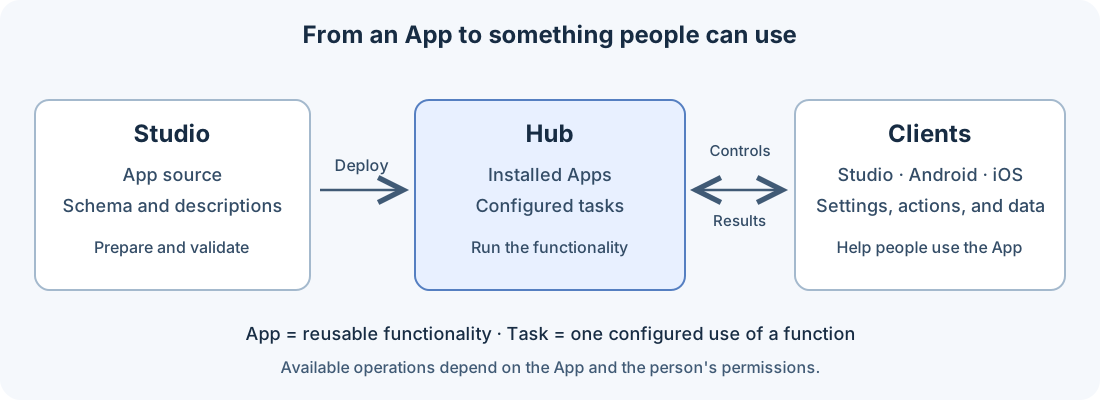
The Hub runs Apps and their configured tasks. Studio is the VS Code extension for working with App projects, validation, deployment, and administration; its Libertas: Open Control Panel command also operates tasks. Android and iOS clients let people administer the Hub and use task controls and results. Every client is subject to the account's permissions.
An App package contains reusable functionality. A function is an entry point for a task. A task supplies the settings for one running use of that function. An App may also publish shared types without executable functions; such a package does not offer a task to create.
Use an existing App
Have access to a configured Hub and the permissions needed for installation and task creation. Start with Administration to inspect Installed Apps, choose a function, and create a task. Read its description and requested permissions before configuring it.
Once the task is available, continue with Task controls to use its actions and read its results. The controls depend on what the App provides.
Develop an App
Start with Using Studio, then the App-development tutorial. You will choose a language, define the App in source, validate it, deploy to a selected Hub, and create a task to exercise it. Publishing it for other people is a later, separate Plaza workflow.